How rule tiles work in BRT
Since version 1.5.0, the data that determines the behavior and look of the default rules are contained in a virtual function inside the Base Rule Tile classes:
Runtime/RuleTiles/BetterRuleTileBase.cs- for square and isometric tilesRuntime/RuleTiles/BetterHexagonalRuleTileBase.cs- fox hexagonal tiles
The main classes used inside the BRT Editor and the Unity tilemap system extend from one of these classes, and override the InitializeCustomNeighborRules. This method returns all the information required to edit the appearance and behavior of the neighbor rules. The benefit of this is that you can create a new class that extends from one of the two base classes, and just by overriding this one method, completely alter how the rules behave.
using VinTools.BetterRuleTiles;

public class MyCustomBetterRuleTile : BetterRuleTileBase
{
	protected override BetterRuleTileNeighbor[] InitializeCustomNeighborRules => new BetterRuleTileNeighbor[]
	{
		new BetterRuleTileNeighbor
			(
			-1, "Delete", "Removes tiles from the grid.",
			(n, t) => true,
			"iVBORw0KGgoAAAANSUhEUgAAAIAAAACACAYAAADDPmHLAAAgAElEVR4Ae...",
			"iVBORw0KGgoAAAANSUhEUgAAAIAAAACACAYAAADDPmHLAAAgAElEQVR4Ae..."
			),

		new BetterRuleTileNeighbor(
			-2, "Empty", "Matches if there is no tile here.",
			(n, tile) => tile == null,
			"iVBORw0KGgoAAAANSUhEUgAAAIAAAACACAYAAADDPmVR4Ae2da...",
			"iVBORw0KGgoAAAANSUhEUgAAAIAAAACACAYAAADDPmHLAAAgAEQVR4Ae2d..."
			),

		new BetterRuleTileNeighbor(
			-3, "Not Same", "Matches if the tile here is different...",
			(n, tile) => tile != this && (!HasVariations || !variations.Contains(tile)),
			"iVBORw0KGgoAAAANSUhEUgAAAIAAAACACAYAAADDPmHLAAY6klEQVR4Ae...",
			"iVBORw0KGgoAAAANSUhEUgAAAIAAAACc8klEQVR4Ae2d+5Mc1XXH9cIIt..."
			),

		new BetterRuleTileNeighbor(
			-4, "Any Tile", "Matches if the tile here is not empty.",
			(n, tile) => tile != null,
			"iVBORw0KGgoAAAANSUhEUgAAAIAAAACACAYAAADDPmHLAeZXXHzb7dkAR...",
			"iVBORw0KGgoAAAANSUhEUgAAAIAAAACACAYAAR4Ae2d+49dV3XHPeOxZ+wZ..."
			),
	};
}
The InitializeCustomNeighborRules returns an array of BetterRuleTileNeighbor objects. Every object in this array corresponds to one default tile in the BRT Editor tile drawer, and requires the properties of the neighbor rule to be set inside the constructor.
There are a few constraints though:
- The rule ids all must be less than 0 - Indexes 0 and above are used for matching with other tiles.
- The rule with id -1 must be a delete rule - The editor uses rule -1 as the delete rule, it’ll always behave as the empty rule no matter the contents of the
ruleMatchCasefunction. The name, description and images can still be changed, but rule -1 will always act as a delete rule. Despite this, the rule -1 should be always defined, because without it the user won’t be able to delete tiles from the grid. - Textures must be in Base64 format - To make sure the scripts don’t lose references to texture assets, the textures are encoded to Base64 format and saved to the script itself. The asset contains a small utility to convert Textures into Base64 strings. On the top of the Unity editor, navigate to
Tools -> Better Rule Tiles -> Open TexToBase64 Converter, here you can select a texture to convert and copy the output string. (Note that the output also includes the quotation marks)
BetterRuleTileNeighbor class
The BetterRuleTileNeighbor class is used to define the properties of neighbors used for tiling rules. All of it’s properties are read only and can only be defined inside the constructor.
The properties of the class:
public readonly int Id = -1;- ID if the rule. Should be less than 0. IDs 0 and up are reserved for tile connectivity, while ID -1 is used for the delete rule. While you can change the name and texture of index -1, it will always delete tiles in the editor.public readonly string Name = "Tile";- The name of the rule. It will be displayed on the editor buttons.public readonly string Description = ""; - Description. It'll show up in tooltipspublic delegate bool RuleMatchCase(int neighbor, TileBase other);private readonly RuleMatchCase _matchCase;- Function to match the rule. It takes in anintand aTileBaseas it’s parameters, and returns abool. Theintegercorresponds to the ID of the neighbor that is being matched, while theTileBaseis an object reference to the tile itself. Usually the tile reference is used to determine the result. The returnedboolindicates whether the checked neighbor matches this criteria or not.private readonly string ButtonTextureString;- A Base64 string for the texture that’ll appear on the editor buttonsprivate readonly string TileTextureString;- A Base64 string for the Texture that’ll be displayed in the editor gridprivate readonly string InspectorTextureString;- A Base64 string for the texture that’ll show up in the inspector (Optional)
Base64
Base64 strings of textures can be generated with the included tool. navigate to
Tools -> Better Rule Tiles -> Open TexToBase64 Converter.
Constructors
public BetterRuleTileNeighbor(int id, string name, string description, RuleMatchCase ruleMatchCase, string buttonTextureString = "", string tileTextureString = "", string inspectorTextureString = "")

public BetterRuleTileNeighbor(int id, string name, RuleMatchCase ruleMatchCase, string buttonTextureString = "", string tileTextureString = "", string inspectorTextureString = "")

public BetterRuleTileNeighbor(int id, string name, string description, string buttonTextureString = "", string tileTextureString = "", string inspectorTextureString = "")
Using custom rule tiles in the BRT Editor
Using custom tiles in the BRT Editor is very straightforward. If you’ve already created a class that extends from the BetterRuleTileBase.cs or BetterHexagonalRuleTileBase.cs classes, you’re basically already done.
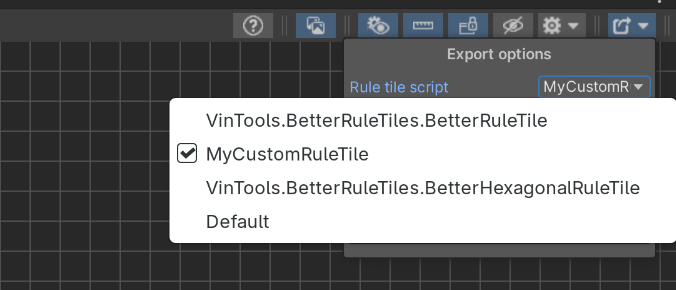
Head to the export options, and your tile should appear in the Rule tile script dropdown. Once selected, the default tiles in the tile drawer and on the grid will change to reflect the selected script.